News
Table of Contents for this page
- VEDIT 6.13 released (Jan. 25, 2005)
- VEDIT Pro64 - 64-bit design edits huge 100+ Gigabyte files (Oct. 30, 2003)
- VEDIT 6.10 released (Feb. 07, 2003)
- VEDIT PLUS 6.03 released (June 21, 2002)
- VEDIT PLUS 6.00 released (Oct. 5, 2001)
- VEDIT PLUS 5.20 released (Sept. 12, 2000)
- Enhanced EBCDIC conversion software (Aug. 9, 2000)
Other Links
- The Newsletter of Nov. 07, 2003 describes VEDIT Pro64. Download
- The Newsletter of Mar. 07, 2003 introduces VEDIT 6.10. Download
- The Newsletter of June 21, 2002 introduces VEDIT PLUS 6.03. Download
- The Newsletter of Sept. 26, 2001 introduces VEDIT PLUS 6.0. Download
- The Newsletter of Sept. 15, 2000 introduces VEDIT PLUS 5.2. Download
- The WHATSNEW.TXT file gives a short description of all enhancements in VEDIT since version 5.00.
- The VEDITLOG.TXT file contains a very brief, one-line, listing of the enhancements, changes and bug fixes since version 5.00.
VEDIT 6.13 (Jan. 25, 2005)
While VEDIT 6.13 is numerically a "minor" release, it includes several significant enhancements:
- "Flat to CSV" conversion of data files, which adds separators between fields for easier import into spreadsheets and databases. The conversion can be automated. Also "CSV" to Flat" conversion.
- By default, "Open with VEDIT" is added to the Explorer context (right-click) menu, making it easier to open any file with VEDIT. (This was a frequently requested feature.)
- "Sort lines & remove dupes" function can remove duplicates from a list of email addresses, data records, etc.
- Improved Unicode conversion of UTF-16 characters to/from the 8-bit OEM or ANSI character sets.
- Improved regular expression searching.
Eligibility:
All VEDIT 6.1x customers are eligible for 6.13. However, if you are still running 6.10, you need a new serial number which was emailed to you on Nov. 4, 2003. Or you can login to get it; you will need to enter the first 5 digits of your old serial number and either your name, zip code or customer ID.
VEDIT Pro64 (Oct. 30, 2003)
The new VEDIT Pro64 uses a 64-bit internal design to edit even 100+ Gigabyte files. It can edit absolutely any text, data, binary, EBCDIC or other file. The regular VEDIT has a maximum file size of 2 Gigabytes.
Even though VEDIT Pro64 is internally a 64-bit program, it still runs with the 32-bit Windows 98/ME/2000/XP.
Currently, the ability to edit larger files is the only advantage of VEDIT Pro64. However, upcoming enhancements for editing data files, EBCDIC files, conversions and sorting will only be available in VEDIT Pro64.
Eligibility:
VEDIT customers that purchased the Software Subscription Plan (SSP) before July 31, 2004 are eligible for VEDIT Pro64. A new serial number was emailed to all VEDIT 6.1 and SSP customers on Oct. 31, 2003. If you do not have it, you can login to get it; you will need to enter the first 5 digits of your old serial number and either your name, zip code or customer ID.
VEDIT customers that purchased the SSP or VEDIT Deluxe after July 31, 2004 can upgrade to VEDIT Pro64 for the price difference of $100.
VEDIT 6.10 released (Feb. 07, 2003)
The flexible new "Project" support in VEDIT 6.10 is perhaps our most useful enhancement ever. With the long list of new features, we are confident you will be very pleased with this new version.
This is a brief description of some of the recent enhancements in version 6.10 from 6.03. For more details:
- Projects - Groups of files that you regularly edit can now be organized into Projects. Projects can be created, opened and closed from the {FILE, Project} submenu and the new "Proj" tab in the File Selector.
- File Locking - As much as possible, VEDIT now edits with "unlocked" files. You can have the same files open in VEDIT and e.g. Visual Studio. When a file changes outside of VEDIT, you are prompted to Reload or Ignore it.
- Wysiwyg Conversion - The new {FILE, Wysiwyg conversion} saves the current file under a new name and converts it to the format as currently displayed on the screen. In other words, it performs a "Save as" with conversion.
- Copy blocks between files - The improved {BLOCK, Copy to cursor} and {BLOCK, Move to cursor} can now directly copy/move a highlighted block from another file (buffer) to the current cursor position. In other words, if the current file does not have a highlighted block, these functions scan the other currently open files for a block. The block can be of any (huge) size.
- Extracting Lines - The improved {MISC, Wildfile wizard} makes it easy to extract all lines that match a search string, from an entire group of files. The extracted lines can then be viewed, printed, or saved to a file.
- Filtering Lines - The new {MISC, More macros, Linefilter} deletes all lines in the current file which either match or don't match a search string. For example, you could delete all lines that contain "www.domain.com", or leave only those lines that contain "ERROR:".
- Status Line - (Windows only) The status line font can be changed by right-clicking the mouse on the status line and selecting "Change font".
- Format Paragraph - Multiple paragraphs, or even an entire file, can now be re-formatted by highlighting the paragraphs and selecting {EDIT, Formatting, Format paragraph}.
VEDIT 6.10 is available as a 32-bit Windows version for Win98/ME/NT/2000/XP.
VEDIT PLUS 6.03 released (June 21, 2002)
VEDIT+ 6.03 has great new features, new manuals and is exceptionally polished and stable. The new VEDIT 6.0 User's and Macro Language Reference manuals include about 100 additional pages, improved explanations and are completely up-to-date for version 6.03. The new manuals are available as .PDF files; the 750 page printed manuals can be ordered for only $20.
- Format paragraph options - "Format paragraph" now starts on the current line and maintains the current indentation. Optionally, it can re-format from the beginning of the paragraph, or change the indentation to the current left margin.
- Enable word wrap - The function {CONFIG, Word processing, Enable word wrap} can now also be accessed from the new {EDIT, Formatting} sub-menu and the toolbar.
- Pad lines to same length - The new {EDIT, Convert, All lines same length} easily makes all lines any desired length. It pads shorter lines with spaces; it optionally truncates longer lines. It can [Scan] the file to determine the length of the longest line. New {USER, Check lines same length} can be used to check that all text lines have the same length.
- Convert Unicode to/from ASCII - The new {EDIT, Translate, Unicode to ASCII} to/from ASCII converts from 2-byte Unicode characters to 1-byte ASCII characters. This allows some Unicode files to be edited in VEDIT. Similarly, the "ASCII to Unicode" function converts from ASCII into 2-byte Unicode characters.
- VEDIT Instance control - You can now control whether files opened from Explorer or the DOS/NT prompt start a new instance of VEDIT or are opened in any existing instance of VEDIT.
- Block Search - It is now much easier to perform a search or search and replace within a highlighted block.
- Block Indent - The block indenting has been improved and completely follows Windows conventions.
- Expanded on-line help - The on-line help has many new topics, including "Opening Files", "ANSI and OEM Characters", "Description of Files", "Converting Files", "Files with Fixed-length Records". The topic "Search and Replace" has been greatly expanded. (Approximately 60 printed pages worth have been added.)
- Language Support - The new VB-BAS.SYN, FORTRAN.SYN, MODULA2.SYN, Support TEALINFO.SYN and TEX.SYN files provide color syntax highlighting for these languages. M2-LT34.SYN, M2-SB22.SYN and M2-SB30 support specific Modula-2 compilers. New LATEX.VCS file provides compiler support for the Miktex compiler.
VEDIT PLUS 6.00 released (Oct. 5, 2001)
This major update has a completely up-to-date Windows interface, much simpler configuration, more flexible startup options and powerful new features including fast, flexible, multi-key sorting of files up to 2 Gigabytes. (Originally planned for August, it took an extra month just to document all the new features in the on-line help.)
As always, it is very compact and has an improved installation. Updates can be installed in less than a minute with just a few clicks.
Convenient new features
-
An optional multi-function "Explorer"-like window that can display the names of all open files, switch to any open file, open any file on your computer, and re-open any recently edited file or file added to your "favorites". See it.
-
A tabbed view of all open files for easier file switching. Microsoft calls this a "Tabbed Document Interface" as found in FrontPage 2002 (tm). See it.
-
Innovative auto-configuration as each file is opened, by file type (filename extension) or specific filename. Easily set the config options for any desired file type, e.g. for each .C, .HTML, .TXT file opened.
-
Support for multiple syntax highlighting and template editing files; this is part of the new auto-configuration.
-
Support for Ctrl-1 thru Ctrl-0, Ctrl+Shift-A thru Ctrl+Shift-Z, Ctrl-Shift-F1 thru Ctrl-Shift-F12, Alt-Shift-F1 thru Alt-Shift-F12 and other keys.
-
{FILE, Open (more), Quick open} and {FILE, Reload} functions.
-
{MISC, Wildfile wizard} makes the powerful "Wildfile" macro easier to use.
-
Instantly record and play back keystrokes.
More Powerful
-
Simultaneously edit up to 100 files (it was previously 32).
-
Exceptionally fast and flexible sorting. Specify the key columns and up to 9 sub-keys, sort ascending/descending, flexible collate table specifies the sort order for special characters. Sort 100+ meg files in just a few minutes.
- Improved comparison of all files in two directories with COMPDIR macro; optionally compares all files in the sub-directories.
- New macro language commands for the power user.
VEDIT PLUS 5.20 released(Sept. 12, 2000)
VEDIT PLUS 5.20, one of our biggest updates ever, has something for everyone. Obviously, it has powerful new features; however, it is also easier to use and faster than ever. And very compact, as always. Here are some of the enhancements since version 5.16.
More Powerful
- Support for extremely long lines/records; 100,000+ columns.
- "ANSI/OEM" display mode translates characters between the ANSI (Windows) and OEM (IBM-PC, DOS) character sets as they are displayed on the screen and typed on the keyboard.
- Translate files between the ANSI and OEM character sets.
- Unique "Bit-wise" display mode for viewing/editing each bit of each byte in a file, e.g. a bitmap file.
- Keyboard "input redirection" file automates running macros.
- 40% faster macro execution.
- Many new macro language commands for the power user.
Convenient new features
- Long text lines can be word-wrapped on the screen without altering the file.
- Quickly compare all files in two directories.
- "VEDIT Ansi" screen font supplied in four sizes.
- New "User Macro Directory" for your own macros.
- {MISC, Save and run programs} menu makes it easy to run frequent programs from within VEDIT.
Easier to use
- Optional rulers for line and column numbers.
- Configurable toolbar.
- Enable cursor line/column highlighting and other display options in the {VIEW} and new {VIEW, Options} menus.
- Optionally disable persistent blocks for compatibility with other editors.
- Extensive hands-on tutorial topics are always available in the {HELP, Tutorial} menu.
- Completely up-to-date and expanded on-line help.
- Optimized for Windows 95/98/ME and Windows NT/2000/XP.
Enhanced EBCDIC conversion software (Aug. 9, 2000)
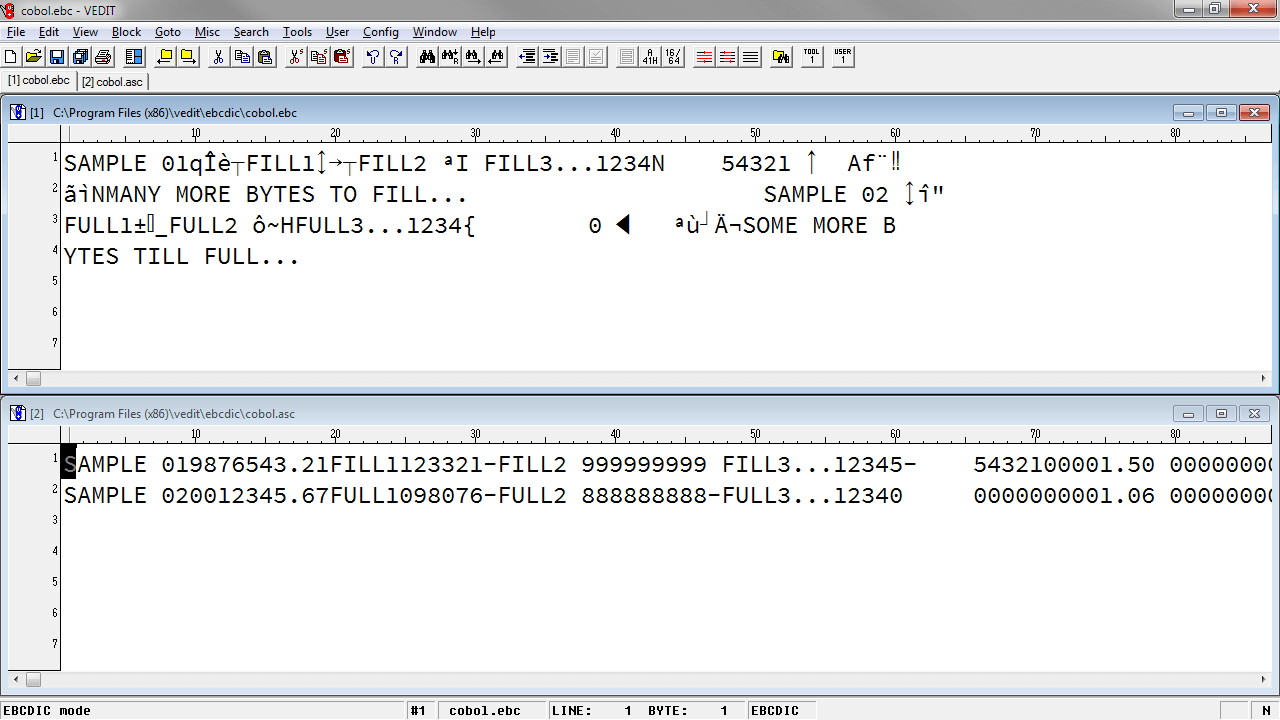
Our EBCDIC (mainframe to PC) conversion packages can translate packed-decimal (signed), packed-binary, zoned, packed-no-zone and other types of fields. Fixed-length, variable length and intermixed record types are all supported. See the EBCDIC page for details.
We can also provide a ready-to-run solution to any EBCDIC/ASCII conversion needs. This is a convenient service if you are not familiar with EBCDIC files and COBOL "copy-books" or prefer to delegate. In this case, we convert your first file(s) and give you the tools to easily convert additional files yourself.
Recent enhancements include:
- Easier setup. A COBOL "copy-book" specification can be pasted directly into the data layout (.LAY) file which controls the conversion. In many cases this is all that is needed to create the .LAY file.
- The top Level-4 package can now convert even the most complex COBOL-based EBCDIC files, including those with multiple "OCCURS DEPENDING ON..." clauses which define repeated groups of fields.
- The Level-4 package can also translate from ASCII to EBCDIC with packed fields. This is useful for creating a mainframe database file from a PC database.
- Faster conversion. The conversion speed has been improved to 5 - 10 megs/minute for a typical EBCDIC file with numerous packed fields. (Assuming a 2 Ghz Pentium.)
- The conversion estimates the time based on the first 100 records and gives a continuous progress report.
- Error log file. All potential conversion errors due to bad data are logged in a file which includes the location of the data.
- Custom conversions. We are very proficient in creating custom solutions for converting unusual (e.g. non-COBOL) EBCDIC and binary files into ASCII. Examples include the binary/EBCDIC output from telephone switches.
The VEDIT trial version includes a trial version of the EBCDIC Level-2 conversion package. This can convert most EBCDIC files with fixed-length records to ASCII. The menu item {HELP, Tutorial, EBCDIC editing} gives a tutorial on EBCDIC editing and conversion.
Since EBCDIC conversion can be complicated, we encourage you to contact us with any questions you might have. And we promise a prompt response (typically within a few hours.)